March 23, 2025
If you have noticed some connection issues using the RDP protocol after Microsoft’s 24H2 windows 11 update then you aren’t alone. Symptoms include 3-4 remote attempts before allowing a connection, or just a black screen with nothing to display after connecting. After a day of turmoil I finally found the resolution which I have listed here. You must make these changes on the remote workstation.
Step 1. Hit the windows key + r to open the ‘run’ dialog.
Step 2. Type gpedit.msc and hit enter
Step 3. Navigate through, Local Computer Policy> Computer Configuration> Administrative Templates> Windows Components> Remote Desktop Services> Remote Desktop Session Host> Connections> and choose ‘Select network detection on the server‘ to ‘enabled’ and select ‘Turn off Connect Time Detect and Continuous Network Detect.’ See the screenshot below.
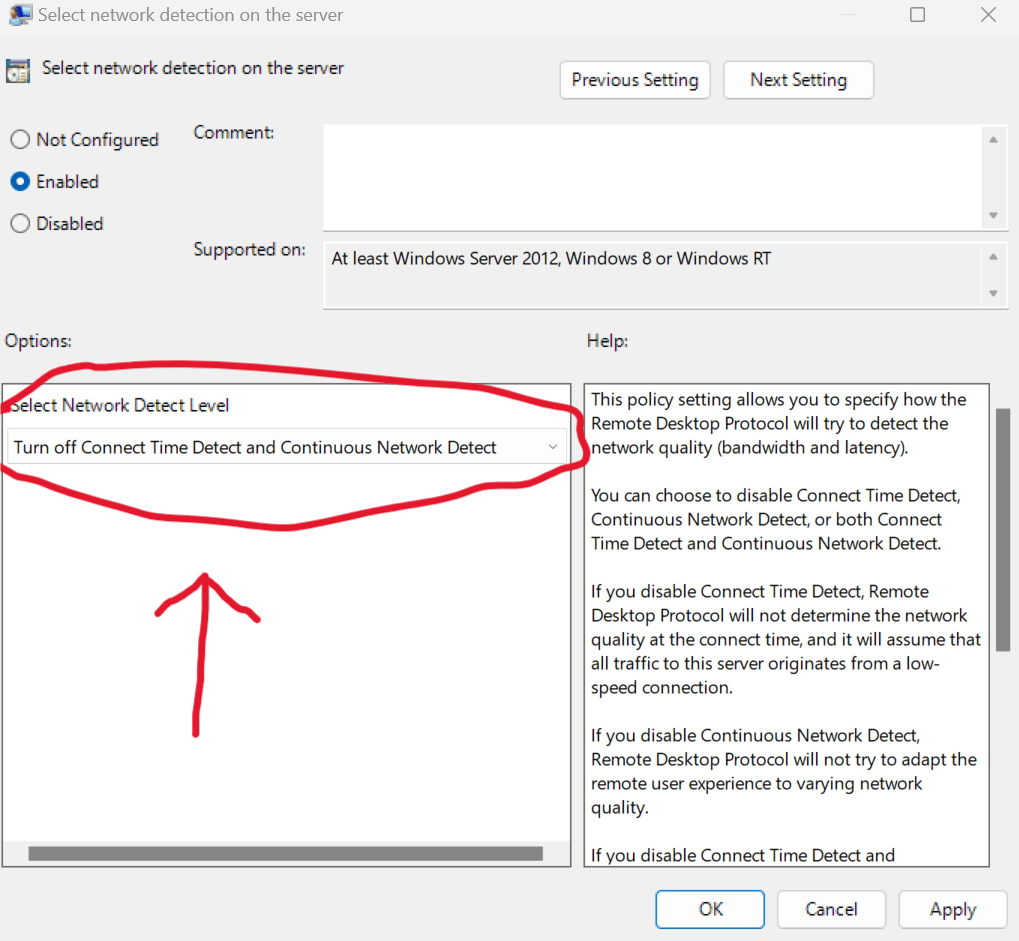
Step 4. Open a command prompt and type ‘gpupdate /force’
Step 5. Sign out and back in as needed before attempting the remote connection again.
I have seen this issue a lot since the 24H2 update came out. Hopefully this helps and will save you some troubleshooting time.
 Zach's Technical Knowledge Base
Leave a comment